8051 Project | Arrogance Gizmo

Electronic Voting Machine Using 8051 Microcontroller (AT89C51)

Friday, 16 March 2012


Circuit

Electronic voting machine has now replaced the traditional mechanism of voting due to several advantages like security, automatic counting etc. This project presents a way to develop an electronic voting machine which displays the count of votes on a 16x2 LCD interface. A user can get his/her vote register through a set of switches (one for each candidate). After every cast of vote, the subsequent count can be seen on LCD. The circuit uses AT89C51 microcontroller and the code for the project has been written in C.

This LCD based electronic voting machine is designed for four candidates. The input part consists of a set of six tactile switches. The switches and 16x2 LCD are interfaced to microcontroller AT89C51 for various operations and displays.

The provision of casting votes for the candidates has been provided through four of these switches. These switches are made active high and connected to pins 2-5 (P1^1 – P1^4) of the controller. The remaining two switches (both active low) are to start and stop the voting procedure. They are connected to pins 1 and 6 (P1^0 and P1^5) respectively. The Init (start) switch initializes the voting system when pressed, while the Stop switch ends the voting and displays the poll results on LCD screen.

For more details on working with LCD, refer LCD interfacing with 8051. The data pins of the LCD (pins 7-14) are connected to the output port P2 of the microcontroller. The control pins (RS, R/W and EN) are connected to port P3 pins P3^0, P3^1 & P3^6 respectively.

Working:
The voting is started by pressing the Init switch after which the user is prompted to vote. The count of votes is stored in four different variables. As soon as the user votes for a candidate by pressing one of the switches, the value of the corresponding variable is increased by one. After this a Thank you message is displayed on LCD to acknowledge the registration of user’s vote.

The message stays on the screen until the next user either presses the Init button to cast another vote or Stop switch is pressed get the poll results. When the stop button is pressed, the names of the candidates are displayed along with their vote counts. After some delay, the result is displayed which could be either declaration of the winner candidate or the candidates with a clash of their number of votes. 

LCD based digital alarm clock using 89S51 microcontroller

Thursday, 1 March 2012


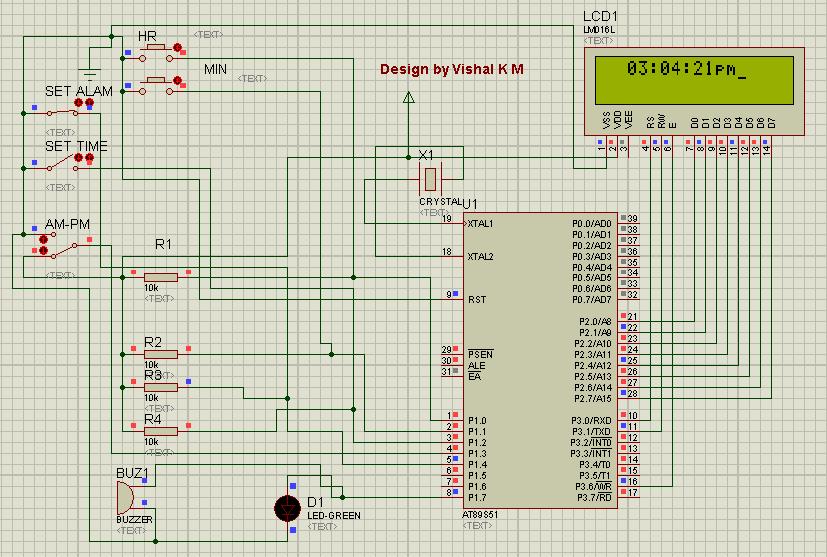
 Circuit Diagram
An alarm clock is a clock that indicates a pre-set time by producing sound at that time. This functionality of digital clock is used to awaken people or remind them of something. A digital clock is one that displays time digitally. The project explained here, displays time on a 16x2 LCD module. The LCD is interfaced with 8051 microcontroller (AT89S51). This circuit can be used in cars, houses, offices etc.

This clock works in 12 hour mode and is configured by programming the microcontroller AT89S51. The program uses a delay function for producing a delay of 1 second.
The connections in the circuit are as following: port P2 of microcontroller is used as data input port which is connected to data pins (7-14) of LCD. P3^0, P3^1 and P3^6 pins of microcontroller are connected to control pins RS, RW and EN of LCD. P1^0, P1^1, P1^2 and P1^3 pins of microcontroller are connected to tactile switches to take manual inputs.

On reset, the LCD prompts the user to set alarm. Only the hour and minute components can be set by pressing the corresponding switches, repeatedly. These switches are made active low and so they provide ground to the corresponding input pins of the microcontroller AT89S51. The AM/PM mode is set by toggling the switch between ground and Vcc. Ground would set the clock in AM mode while Vcc would set it in PM mode.


After that the LCD prompts the user to set time. Only the hour and minute components can be set by pressing the corresponding switches, repeatedly. These switches are made active low and so they provide ground to the corresponding input pins of the controller. The AM/PM mode is set by toggling the switch between ground and Vcc. Ground would set the clock in AM mode while Vcc would set it in PM mode. The clock starts when start pin is connected to Vcc by pressing the switch.

The set time is displayed on LCD screen and changes as the time passes on. Seconds are increased after every one second by making use of delay function. As second reaches 59, minute is incremented by one and second is reset to 0. Similarly, as minute reaches 59, hour is increased by one and minute is set to 0. After hour reaches 11, minute reaches 59 and second reaches 59, all of them are set to 0 and the AM/PM mode is changed accordingly.


CODE


When the clock time becomes equal to the alarm time, a message ‘Alarm’ is displayed on LCD and alarm pin of microcontroller goes high for some duration. This pin can be connected to a speaker or buzzer to sound the alarm at the pre-set time.

Copyright @ 2013 Arrogance Gizmo |

Follow Us On Facebook

Labels

.Net (2) 1 KM Range Wireless (1) 16x2 Character LCD (9) 2 UART (1) 4x3 Keypad (1) 4x4 keypad (1) 8051 (5) 8051 Project (2) 8051 Projects (1) 8051 Tutorial (3) 89C51 (4) 89C51 Project (2) 89S51 (1) 89S52 (1) Additional UART (1) Android (3) Android AVD (1) Android Programming Tutorial (1) Android Tutorial (2) Arduino Board (1) ARM Projects (1) Atiny (1) Atmega8 (1) AVR (5) AVR Projects (1) Build From Scratch (1) C# (1) C# Serial Port (2) C# serial Terminal (1) C# Voltmeter (1) Camera (1) Clock (1) Digital Voltmeter (2) Digital watch (1) DIY (2) EEPROM (2) Electronic code lock (1) Embedded (16) Embedded Project (9) Embedded Projects (2) Embedded Tutorial (12) Embeded (4) Extra UART (1) Flutter (1) Getting Started With Android (2) Home Security (1) Internet Based Device Control (1) Java of Things (1) Keypad (1) Keypad Tutorial (1) LCD (6) LCD Tutorial (4) Linux (1) Lock (1) LPG Sensor (1) MAX232 (3) Microcontroller (14) Microcontroller generates sound (1) Microcontroller Interrupt (1) Microcontroller Project (5) Microcontroller Tutorial (11) Microcontroller Tutorial. 8051 Tutorial (1) Mikoc 4 Bit LCD (3) MikroC (14) MikroC AVR (3) MikroC AVR Tutorial (3) MikroC EEPROM (2) MikroC for 8051 (4) MikroC Getting Started (1) MikroC PIC Tutorial (6) MikroC Tutorial (3) Motor Control (1) NETMF (1) New Embedded Boards (2) Optical Mouse (1) Optical Mouse To Camera (1) Password Lock (1) PC Based Voltmeter (1) PIC (7) PIC Based Electronic Lock (1) PIC 12F629 (1) PIC ADC (2) pic interrupt (1) PIC Music (1) pic project (1) PIC Projects (1) PIC sound melody (1) PIC Tutorial (3) PIC UART (1) PIC Voltmeter (2) Project (8) Quadcopter (1) Real Time Monitoring (1) RF (1) Robotic Projects (1) RS 232 (1) Run Android On PC (1) Security System (1) Serial Communication (3) Single Bord Computer (1) Smart home (1) Smart Home Project (1) STM32 (4) STM32F4 (3) STM32F4 Discovery (3) STM32F4 Project (1) STM32F4 Tutorials (3) STMicroelectronics (1) Temperature Sensor (2) Timer (1) Tutorial (8) UART (6) Udoo (1) USB (1) USB to RS 232 (1) USB to UART (1) VISUAL STUDIO (1) Water Level Control (1) WiFi (1)

Search This Blog

Popular Posts